
Phone stolen in London: what to do in the first hour
Phone just stolen? On any device — a friend’s phone, a work laptop — go to icloud.com/find and mark it as lost (you won’t need a verification code), then freeze your bank cards, block your SIM and IMEI with your network, report the theft to the Met online to get a crime reference number, and change your email password. Each step below takes minutes, in the order that limits the damage fastest.
Step 1: Mark it as Lost — minutes 0–5
Open icloud.com/find in any browser and sign in with your Apple Account. Select the stolen iPhone from the device list, then tap Lost iPhone and follow the prompts.
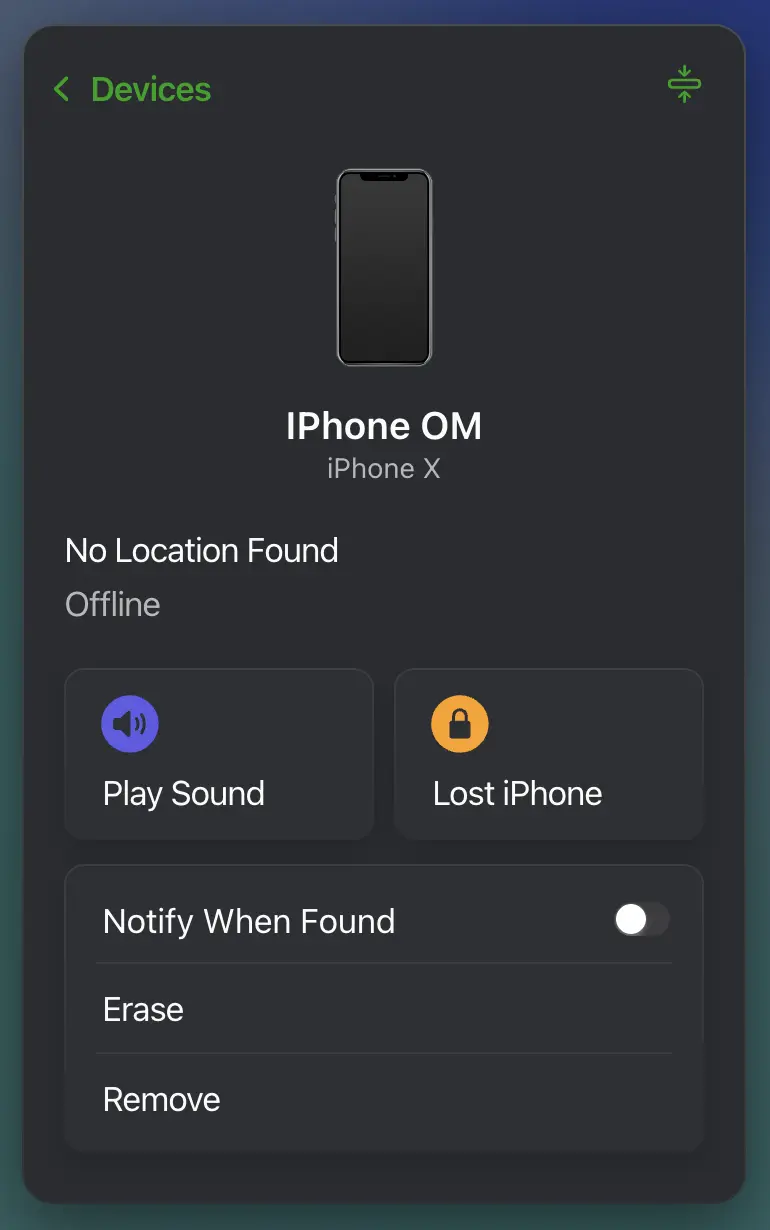
This one action does most of the heavy lifting: the phone locks with its passcode, Apple Pay is suspended on it, and it keeps reporting its location to you — even, since iOS 15, if the thief erases it.
Two counterintuitive rules for a stolen phone, both straight from Apple’s own guidance:
- Don’t put your contact details in the lock-screen message. For a lost phone, a “please call me” note helps an honest finder. For a stolen one, it hands the thief exactly what they need to phish you later — Apple explicitly recommends against adding contact info when you believe the device was stolen.
- Don’t erase it, and never remove it from Find My. Erasing early costs you nothing but options — the phone stays locatable — but removing it — the button sits right under Erase on that same screen — releases Activation Lock, the protection that stops the handset being wiped and set up as someone else’s. Activation Lock is what makes a stolen iPhone nearly worthless; thieves’ phishing exists precisely to get you to switch it off. If you have AppleCare+ with Theft and Loss, there’s a second reason: don’t remove the device before your claim is approved.
Snatched while it was unlocked?
The honest answer: Mark as Lost still locks it remotely the moment the phone touches a network, and a grabbed phone usually goes into a bag or airplane mode within seconds — the thief is running, not reading. But assume anything that was open on screen — email, messages, a logged-in browser — has been seen. It changes nothing about the order of these steps; it just makes Step 5 more urgent.
Step 2: Freeze your money — minutes 5–15
Your banking apps almost certainly demand Face ID or a PIN on every open, so the apps themselves are likely safe. The exposure is your number (until Step 3 kills the SIM, it can receive your security codes) and any physical cards that went with the phone.
From a borrowed phone, the fastest route to your bank is 159 — the Stop Scams UK service that routes you straight to your bank’s fraud team; it covers the vast majority of UK current accounts. Tell them the phone was stolen, freeze the cards stored in its wallet, and ask them to flag the account. If you can sign in to web banking from a laptop, the freeze-card switch there does the same job.
Apple Pay, one worry you can cross off: marking the phone as Lost in Step 1 already suspended it on that device.
Step 3: Block the SIM and the IMEI — minutes 15–30
One call to your network, two requests: a SIM block, so the thief can’t use your number or receive your security codes, and an IMEI blacklist, which disables the handset itself on every UK network. Reporting within 24 hours is what caps your liability for unauthorised use at £100 — the clock is the reason this step can’t wait until morning.
The exact numbers, per-carrier quirks, and how to find your IMEI without the phone are all in our IMEI blocking guide — it’s written to be worked through in one call.
Step 4: Report it to the Met — minutes 30–45
Report online at met.police.uk/ro/report — it works from any device and gives you a crime reference number, the one artefact your insurer, and sometimes your carrier, will ask for. Prefer a phone call? That’s 101, the non-emergency line. 999 is only for a robbery happening right now, or if you’re hurt.
Have ready: when and where it happened, what was taken, and the IMEI — the IMEI guide shows five ways to find it without the phone. If Find My is showing a live location, include it in the report and update the police if it moves.
Will they chase the dot on the map?
Expectations, honestly set: sharing the location genuinely helps — it feeds the intelligence picture, and recovery operations do use tracking data — but an individual moving dot doesn’t guarantee a dispatch. What it must never do is send you: Apple’s guidance is blunt about not confronting whoever has your device, and it’s right.
Step 5: Lock down your accounts — minutes 45–60
Email first. Your inbox is the master key — password resets for everything else land there. Change its password from the borrowed device, sign out other sessions, and check two quiet-compromise spots: forwarding rules and filters. A thief who had your open inbox for five minutes may have set mail to copy itself somewhere before you changed anything.
Then your Apple Account. If there’s any chance the thief knows your passcode — shoulder-surfed before the grab — change the Apple Account password too. Review your device list at account.apple.com, but remember the rule from Step 1: the stolen iPhone stays in the list. Removing it releases Activation Lock.
Then the rest, in order of damage: banking (already flagged in Step 2), password manager, socials, anything with saved cards. Where two-factor codes went to your number, they’ll work again the moment your replacement SIM arrives — one more reason Step 3 matters.
The days after
The insurance claim. Crime reference number plus proof of barring from your carrier — the IMEI guide covers which networks provide what, and EE for one will also supply proof of purchase if you ask. Check your policy’s reporting window and don’t sit on it; a day or two is the safe assumption.
The replacement SIM restores your number, your reachability, and your SMS codes. While you’re at it, register the stolen phone’s details on immobilise.com — it doesn’t block anything, but it’s the property register police check when devices are recovered.
An hour in, take stock: the phone is a locked, tracked brick with your apps shielded behind Activation Lock, your money is frozen, your number is coming back on a new SIM, and the paper trail your insurer needs exists. You’re one of roughly two hundred Londoners this happened to today — the statistics page covers that scale and where the phones end up — but the damage, for you, stops here.
Frequently asked questions
Should I erase my stolen iPhone straight away?
No. Mark it as Lost first — since iOS 15 an erased iPhone can still be located, but erasing early costs you options. And never remove the device from Find My: that releases Activation Lock, which is the one thing making the handset worthless to sell.
Do I call 999 or 101 for a stolen phone in London?
999 only if the robbery is happening right now or someone is hurt. Otherwise report online through the Met's website or call 101 — you'll get the same crime reference number either way.
My phone was snatched while unlocked — what's different?
Marking it as Lost still locks it remotely the moment it's online. But assume anything that was open — email, messages, browser sessions — has been seen, and get to the account lockdown step as fast as you can.
Can the police track my stolen phone with Find My?
You can — and should — include the live location in your report and update it if it moves. Whether officers act on an individual location varies, so don't count on a dispatch. Never go after the phone yourself; Apple's own guidance says the same.
Will insurance pay without a police report?
Almost never for theft. The crime reference number is the artefact every insurer asks for, so report promptly and keep the number safe — policies also expect the theft reported to them quickly, often within a day or two.
I got a text saying my iPhone was found. Is it real?
No. Apple never contacts you to tell you a lost device has been found. It's phishing for your Apple Account password — don't tap the link, and forward the text to 7726, the free UK scam-reporting number.
Sources
- Apple — If your iPhone or iPad was stolen Accessed 7 July 2026
- Apple — How to find your lost iPhone or iPad Accessed 7 July 2026
- Apple — About Stolen Device Protection Accessed 7 July 2026
- Apple — Use Lost Mode in Find Devices on iCloud.com Accessed 7 July 2026
- Metropolitan Police — Report a crime Accessed 7 July 2026
- Ofcom — Lost or stolen phone Accessed 7 July 2026
- Stop Scams UK — 159 Accessed 7 July 2026
- Bank of England — Scams and fraud Accessed 7 July 2026
- Citizens Advice — What to do if your mobile phone is lost or stolen Accessed 7 July 2026