
How to block a stolen phone's IMEI in the UK: EE, O2, Vodafone, Three
To block a stolen phone in the UK, contact your network — EE, O2, Vodafone or Three — and ask for two things: a SIM block, so nobody can use your number, and an IMEI blacklist, which makes the handset itself unusable on every UK network. It’s free, and reporting within 24 hours caps your liability for unauthorised use at £100.
A SIM block and an IMEI blacklist are two different things
This is the distinction that most people — and some call-centre scripts — blur, so hold onto it.
A SIM block cancels your SIM. Nobody can make calls, burn through your data, or receive your security codes on your number. It protects your bill and your identity, but the handset itself still works with any other SIM inside.
An IMEI blacklist disables the handset. Every phone has a unique 15-digit serial number — the IMEI — and when your network adds it to the industry’s shared blacklist, the device stops working on UK networks entirely, whatever SIM the thief puts in it.
You want both, and you should ask for both by name — say the word handset explicitly, so the agent bars the device and not just the SIM. A SIM block alone leaves the thief with a working phone; an IMEI blacklist alone leaves your number exposed.
One correction while we’re here, because half the advice online gets it wrong: registering your phone on Immobilise does not block anything. Immobilise is the national property register — it helps police identify and return recovered phones, and it’s worth doing, but Recipero (who run it) state plainly that flagging a phone there does not block the IMEI or the SIM. Only your network can do that.
Find your IMEI without the phone
Every carrier will ask for the IMEI, and the famous *#06# trick is
useless once the phone is gone — yet it’s still the first thing most
guides tell you. Here’s what actually works after the theft:
-
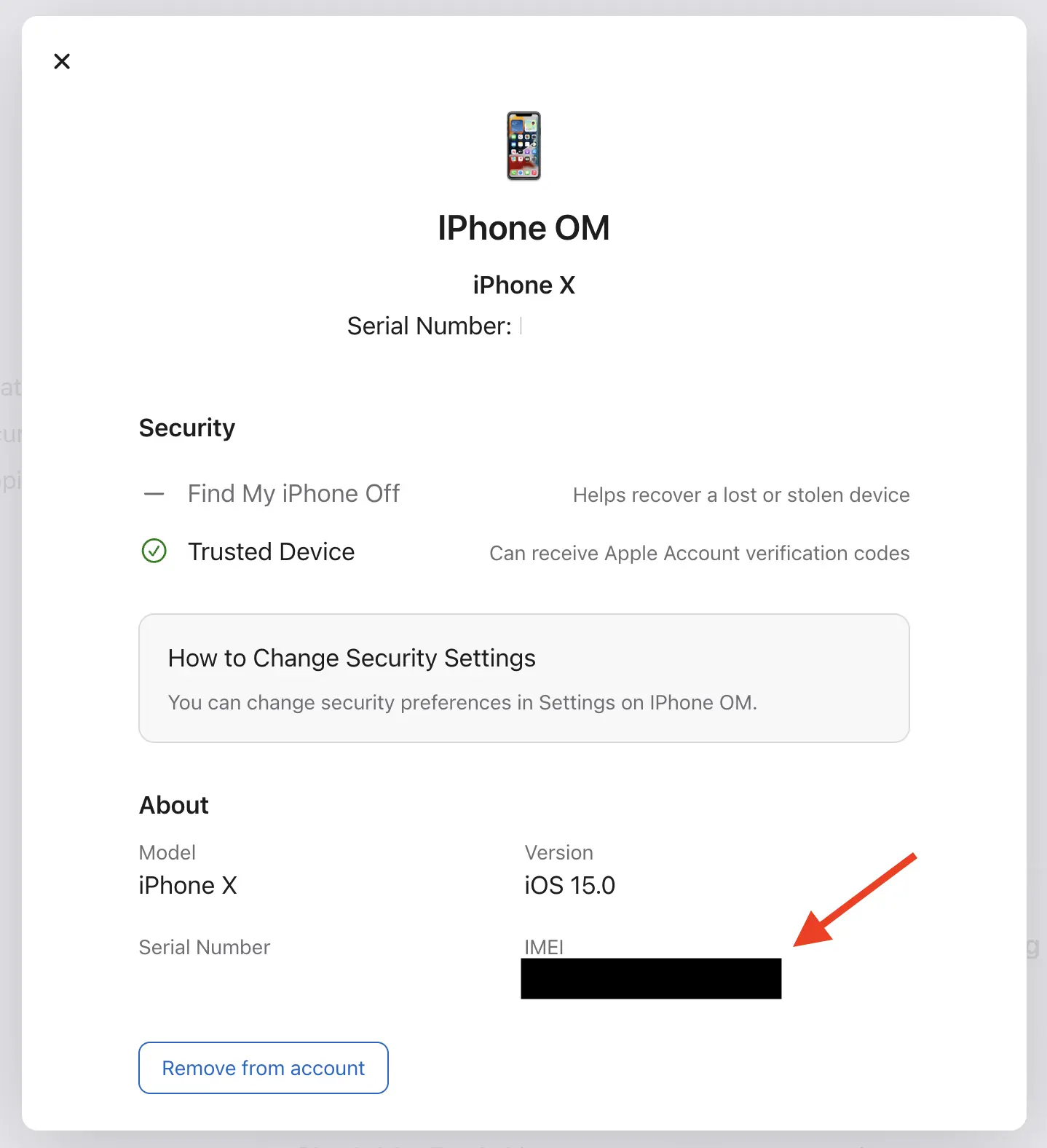
Your Apple Account device list. Sign in at account.apple.com from any browser, open Devices, and select the stolen iPhone — the IMEI is listed in its details.
-
The box. The IMEI is printed on the barcode label.
-
Your receipt or order confirmation from the retailer or carrier.
-
A computer you’ve synced with. In Finder (or iTunes on a PC), select the device and click the phone number under its name — the IMEI cycles into view.
-
Your network. They hold the IMEI of the device that was using your SIM — Citizens Advice confirms they can read it back to you when you call. So even with none of the above, you’re not stuck.
Every number below was checked against the network’s own published pages on the “last updated” date at the top of this guide — the Sources section links each one. If a number ever fails to connect, the carrier’s own lost-or-stolen page is the canonical fallback.
EE
Call 07953 966 150 (+44 7953 966 150 from abroad) — EE’s dedicated lost-and-stolen line — as soon as you can; the 24-hour window for the liability cap starts from the theft, not from when you feel ready.
Ask for the SIM block and the IMEI blacklist together. EE will also suspend your account (you can protect it with a password in case the phone turns up), and send a replacement SIM — delivery is charged, or pick one up free in an EE store.
Two things worth asking for on the same call, because you’ll need them later: proof of barring and, if the phone came from EE, proof of purchase — EE provides both for insurance claims, but you have to ask. If you have itemised billing, your EE account also shows the last numbers dialled, which helps establish when the theft happened.
O2
O2’s lost-and-stolen line runs 24 hours a day: 0344 809 0202 for Pay Monthly, 0344 809 0222 for Pay As You Go, 0800 977 7337 for Business, and +44 7860 980 202 from abroad.
O2 has also started letting you apply a bar yourself: sign in to My O2 and look for the option to apply, view or manage a bar on your service — O2 notes it’s still rolling out, so not every account sees it yet. Useful at 3am, but still confirm the handset (IMEI) blacklist with a human afterwards, and say the word handset explicitly — you want the device barred, not just the SIM.
O2 asks you to report a theft to the police within 24 hours as well — the crime reference number goes into any insurance claim — and will send a new SIM with your existing number while the old device is blocked.
Vodafone
From a Vodafone mobile, call 191 free (or +44 7836 191 191 from abroad). Without one — which is the likely situation — use the Lost or stolen page on vodafone.co.uk: it walks you through barring the SIM via a quick chat with the TOBi assistant and ordering a replacement SIM on your existing number.
Vodafone is explicit about what the blacklist does: the IMEI goes into the industry database and the handset becomes unusable on any UK network, even with a different SIM. Ask for the SIM block alongside it, request written confirmation of the bar for your insurer, and note Vodafone’s own safety line: never use a find-my feature to track down and confront whoever has your phone.
One Vodafone-specific quirk in the liability rules: report within 24 hours and the standard £100 cap applies — but Ofcom notes that if you miss that window, reporting within five days still caps unauthorised use at £500.
Three
Call 333 free from any Three phone, or 0333 338 1001 from any other phone; from abroad, +44 7782 333 333. Live Chat runs 8am–8pm on weekdays and 9am–6pm at weekends.
Three cancels the SIM and blacklists the handset, and is unusually transparent about the timing: once blacklisted, the phone is blocked on Three’s network within 24 hours and on all other UK networks within 48 hours. If you’ve been the victim of a crime, Three’s own advice is to call the police first and get your crime reference number, then ring them. A replacement SIM with your existing number follows.
What an IMEI block does — and what it doesn’t
It does brick the handset for UK use. The blacklist is shared between the networks, so a blocked phone can’t just be revived with a SIM from a different carrier.
It doesn’t end the story abroad. UK blacklisting generally doesn’t follow the phone overseas — which is precisely why organised gangs ship stolen handsets out of the country rather than reselling them here. The scale of that trade is genuinely startling: our London phone theft statistics page covers where the phones actually go.
It doesn’t replace Activation Lock — and Activation Lock doesn’t replace it. The IMEI block stops the phone connecting to UK networks; Apple’s Activation Lock stops it being wiped and set up as someone else’s. They protect against different resale routes, and you want both standing. (That’s also why you should never remove a stolen iPhone from Find My — the first-hour guide covers that trap.)
It’s reversible. If your phone comes back — police recoveries do happen — the network that blocked it can normally reactivate it for you as the owner.
After the block
Police report. Report the theft to the Met — online or via 101 — and note the crime reference number; it’s the artefact every insurer asks for. The first-hour guide covers what the report involves.
Insurance. Send your insurer the crime reference plus the proof of barring (and proof of purchase, if your carrier supplied the phone). One caveat from Citizens Advice worth knowing: the £100 cap applies to monthly contracts — on Pay As You Go, credit spent before you reported the theft may simply be gone. And if any charges appear on your bill after the time you reported it, dispute them: you’re not liable for those.
Immobilise — now, and properly framed. With the blocking done, register the phone’s details on immobilise.com. It won’t block anything, but it’s the register police check when phones are recovered, and it costs nothing.
Then take a breath. The handset is a brick on UK networks, your number is safe, and the paperwork trail for your insurer exists. What’s left is account hygiene — passwords, sessions, and the phishing wave that follows every theft — and that’s step five of the first hour.
Frequently asked questions
Is blocking the SIM the same as blocking the IMEI?
No. A SIM block protects your number and your bill; an IMEI blacklist disables the handset itself, so it won't work on UK networks even with a new SIM inside. When you call your network, ask for both by name.
How long does an IMEI block take?
It applies to your own network first and then spreads to the others through a shared industry database. Three, for example, says a blacklisted phone is blocked on its network within 24 hours and on all other UK networks within 48 hours.
Can I find my IMEI after the phone is stolen?
Yes. Check the device list in your Apple Account at account.apple.com, the barcode label on the phone's box, your purchase receipt, a computer you've synced the phone with, or ask your network — they hold the IMEI of the device that was using your SIM.
Does an IMEI block work outside the UK?
Generally no — the blacklist is shared between UK networks. That's exactly why organised gangs export stolen handsets abroad instead of reselling them here.
Can a blocked phone be unblocked if I get it back?
Yes. If your phone is found, the network that blocked it can normally reactivate it for you as the owner.
Do the police block stolen phones?
No. Only your network can block the SIM or blacklist the IMEI. The police give you a crime reference number, which you'll need for an insurance claim.
Sources
- Ofcom — Lost or stolen phone Accessed 7 July 2026
- EE — My device has been lost or stolen Accessed 7 July 2026
- O2 — What to do if your device is lost or stolen Accessed 7 July 2026
- Vodafone — Lost or stolen device Accessed 7 July 2026
- Vodafone — Contact us Accessed 7 July 2026
- Three — Lost your phone or had it stolen? Here's what to do Accessed 7 July 2026
- Three — Reporting your device lost or stolen Accessed 7 July 2026
- Apple — Find the serial number, EID, or IMEI on your iPhone Accessed 7 July 2026
- Citizens Advice — What to do if your mobile phone is lost or stolen Accessed 7 July 2026
- Immobilise / Recipero — Reporting your phone as stolen in the UK Accessed 7 July 2026